SHIELD DRM Usage Related FAQ
This document is related to SHIELD DRMReceived Q&AWowTechnical Background/Response GuideThis is a document that is listed together.
Document Scope— All questions and answers in this document areMicrosoft 365 Environment StandardsThis is. MIP document ownership, event receivers, and Azure app configuration are unique concepts of Microsoft 365 and do not apply to the Google Workspace environment. Questions related to Google Workspace integration will be provided in a separate document.
Document Conversion / Ownership
Q1. Can I set the MIP document owner to myself when uploading to the cloud?
phenomenon: When you upload a DS document from your local PC to the cloud, the MIP document owner will be displayed as the Security365 app instead of the user themselves.
Not possible.
When converting in the cloudAzure Application PermissionsConversion is performed, and conversion through user delegation permissions is not supported.
Technical Background
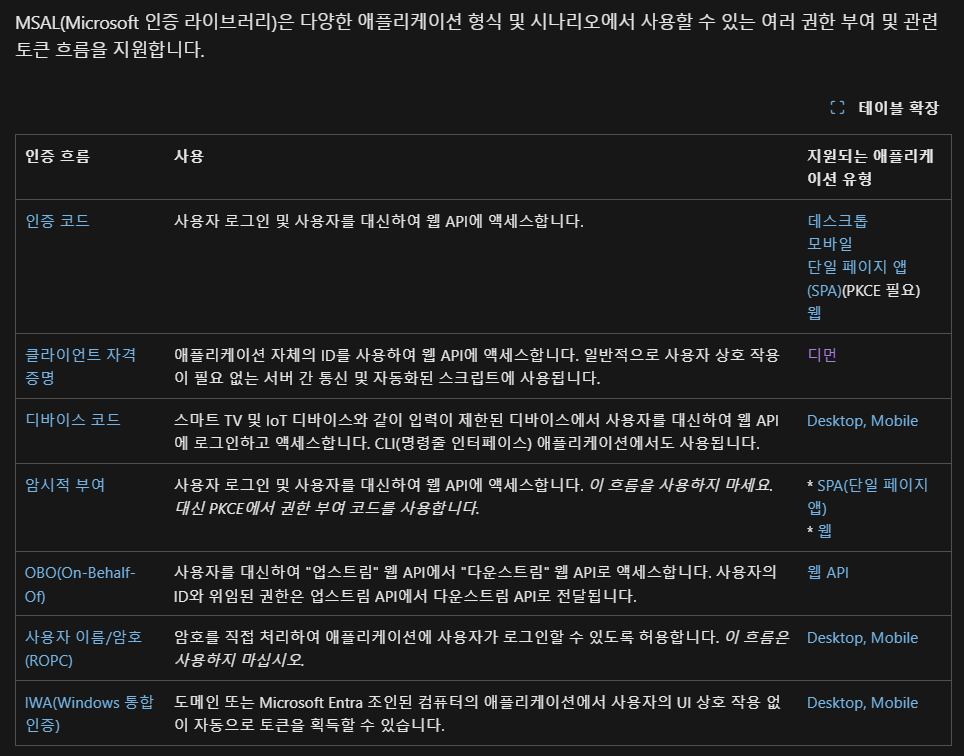
SHIELD DRM is based on Microsoft Entra ID (formerly Azure AD)MSAL Authentication Flowsupports,DaemonAdopt a type.
- Daemon ModeWhat is it?
- It is a method in which services/applications operating in the background perform authentication/authorization without user intervention.
- It is mainly used for communication between servers or automation tasks.
- Client Credential Flow
- the app itselfClient ID / Client SecretObtain tokens using __PH_0__.
- User login information is not required.
- As a resultIt is not possible to convert the document to the user’s own ownership or delegate ownership.
Response Measures
- Label PolicyIt can be configured to allow changing labels regardless of the owner.
- Enabling this policy allows for the normal change of labels for app ownership documents.
Reference Document
- Summary of MSAL Authentication Flow
- [SHIELD DRM Specification]https://devdocsy.softcamp.co.kr/SHIELDDRM/summary/specification/#cautionary-notes)
Event Receiver
Q2. Can we prevent the automatic installation of event receivers when creating a new SharePoint Site?
Yes, it is possible.
The action is of SHIELD DRM's**"Real-time Detection"**Controls with features.
- Real-time Detection ON: When a new OneDrive/SharePoint site is created, an event receiver willAutomatic Installationdoes.
- Real-time detection OFF: Even if a new site is created, the event receiver willnot automatically installed and, the administrator must install it directly.
Therefore, if you do not want automatic installation for the new site,**Turn off "Real-time Detection"**You can set it to.
Settings Location
- SHIELD DRM Admin Page →[Integration Management] → Event ReceiverSet in the policy (option) area in the menu.
- ※ The exact menu names/paths may vary depending on the version of the admin screen in operation, so final confirmation based on the actual screen is necessary.
Q3. Can I delete the event receiver for a specific site and prevent it from being automatically reinstalled?
The form you inquired about — that is**"The feature to 'delete the event receiver for a specific site and permanently exclude that site from automatic reinstallation' is currently not available."**
- The deletion of the event receiver can be performed on the admin page, but,
- There are no site-specific exception settings to keep a site in the "Excluded from reinstallation" status.
- Q2's**"Real-time detection" is the entire newly created site.**This is an ON/OFF setting and is not intended for selectively excluding specific sites.
Therefore, the requirement for "deletion of specific sites + exclusion of automatic reinstallation" is not currently met by the existing functionality.
Azure App Configuration
Q4. Why are there 6 SHIELD DRM Azure apps and what is the role of each app?
6 apps areDoes not perform different roles for each app.
SHIELDRM_Main and Sub1~5 areFunctionally identical appand the reason for dividing the app into 6 parts isDistributed Throttling of Microsoft Graph APIto do so.
App Configuration
- Security365 (separate 1 app): This is a common app that has the authority to use SOFTCAMP services.
- SHIELDRM app (6 = Main + Sub1~Sub5): This is an app that has permission to use the SHIELD DRM service. (The 6 apps displayed on the admin screen fall under this category)
Reason for Operating with 6 (Throttling Distribution)
- Microsoft Graph (M365 API) hasThrottling(Throttling) exists. To ensure service availability and stability, the number of calls is limited within a certain time period, and when the limit is exceeded, additional requests from the app are restricted for a certain period of time.HTTP 429Returns (Too Many Requests) and sends the recommended wait time in the response header.
- A significant portion of this limitApp (Application) Unitis applied.
- Therefore, by distributing calls across multiple apps instead of concentrating them on a single app, each app will have its own limit, reducing the likelihood that a single app will hit the limit.
- Currently, operating 6 SHIELDRM apps (Main + Sub1~5) is a configuration to alleviate this throttling.